NAV 2018 vs. Business Central: Should You Upgrade, and What Changes?
If you’re running Microsoft Dynamics NAV 2018, you’re likely asking one of two questions: “Do I need to upgrade to Business Central?” or “What actually changes if I do?” Here’s a direct answer to both, along with the details behind them.
What is the main difference between NAV 2018 and Business Central?
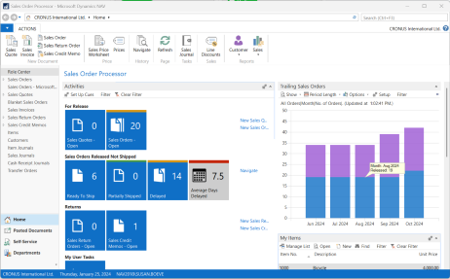
NAV 2018 is an on-premises-only ERP system with manual updates, no AI capabilities, and a retired Windows desktop interface. Business Central is Microsoft’s cloud-based (with on-prem/hybrid options) successor, built with automatic updates, native AI/Copilot features, extension-based customization, and deep Microsoft 365 integration. In short: NAV 2018 is a legacy platform in extended support; Business Central is the actively developed, modern replacement.
Is NAV 2018 still supported?
Yes, but only for a limited time. NAV 2018 mainstream support ended in January 2023, and extended support runs through January 2028. Earlier NAV versions are already fully out of support. Extended support exists to give companies time to plan a transition — it is not intended as a long-term home for your ERP system.
Can I still deploy Business Central on-premises?
Mostly no. Business Central is primarily a cloud-based SaaS solution. A perpetual, on-premises license used to be available for new customers but was discontinued on April 1, 2025. On-premises deployment itself hasn’t gone away — new customers can still license it on a subscription basis — but the perpetual purchase option is gone, and Microsoft continues to steer new customers toward the cloud as the default path forward.
What replaces NAV’s development model in Business Central?
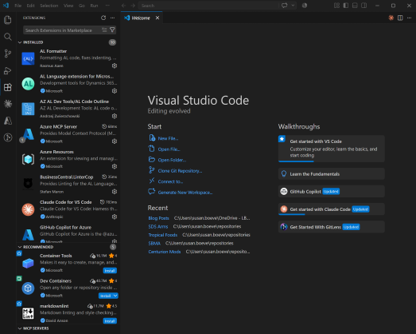
NAV used C/AL, which modified the core application code directly — meaning every customization added upgrade risk. Business Central replaces this with the AL language and extension-based development, so customizations live independently from the core system. This is the single biggest technical change: it’s what makes Business Central’s twice-yearly update cycle (April and October) plus monthly incremental updates possible without breaking your custom code.
Does Business Central have AI built in?
Yes. NAV 2018 has no AI capabilities at all. Business Central includes native Copilot features, such as:
- Suggested item descriptions
- Bank reconciliation assistance
- Cash flow forecasting
- Intelligent data entry
These AI features are cloud-native — they are not available in on-premises NAV environments, which is one more reason the cloud path matters if AI tooling is a priority for your team.

How does licensing change between NAV and Business Central?
NAV uses a perpetual, concurrent-user license — a fixed model that’s expensive to adjust. Business Central uses a per named user, subscription-based model, where the user count flexes up or down as your headcount changes.
What is the “Bridge to Cloud” promotion?
Bridge to Cloud is a Microsoft promotion that lets you run NAV and Business Central licenses side by side during a transition. Instead of renewing your NAV license at renewal time, you purchase Business Central licenses of equal value and receive a 30% discount on all BC licenses for three years, while your NAV license stays active. It’s designed specifically to remove the “big bang cutover” risk from an upgrade.
Can I add third-party extensions in Business Central the way I could in NAV?
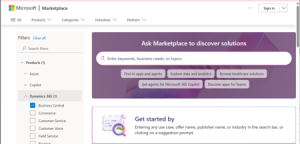
Not the same way — it’s easier. NAV required manual code merges for any ISV add-on. Business Central connects to AppSource, a real marketplace where extensions can be installed, tested, and removed with minimal friction.
What functional capabilities does Business Central have that NAV 2018 doesn’t?
Business Central includes a substantial list of native features with no NAV 2018 equivalent:
Finance & Accounting
- Direct G/L dimension corrections
- Native Power BI integration
- AI-assisted bank reconciliation and cash flow forecasting
- Native expense reporting and subscription billing
Data & Reporting
- Export/re-import to Excel
- Analysis Mode for ad hoc data exploration
- Embedded Power BI dashboards in role centers
Supply Chain & Warehouse
- Fixed quantity in Bills of Materials
- Default dimensions by location
- AI-powered demand forecasting
- Native Shopify integration
- Enhanced warehouse bin ranking and breakbulk handling
Manufacturing
- Enhanced production planning and order functionality
- Improved assembly-to-order/assembly-to-stock integration
Project Management (Jobs)
- Expanded Jobs module with inventory picks tied to jobs
- Improved time tracking and budgeting
Other
- Native duplicate-record merging for customers, vendors, and contacts
- Microsoft Teams collaboration integration
- Native ESG/sustainability tracking module
- Built-in e-document framework for electronic invoicing
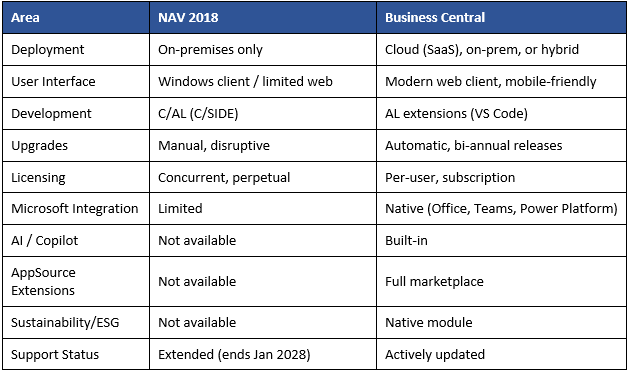
NAV 2018 vs. Business Central: Quick Comparison
So, should you upgrade from NAV 2018 to Business Central?
If your NAV license renewal is approaching, or if your team needs AI tooling, mobile access, or easier third-party integrations, the answer is generally yes — and the Bridge to Cloud promotion makes the timing of that move more flexible than a hard cutover. NAV 2018 and Business Central share a common foundation, but BC has moved well beyond it with cloud flexibility, built-in AI, a real extension marketplace, and modern integrations that used to require custom development in NAV.
Frequently Asked Questions
Is NAV 2018 the same as Business Central?
No. They share a common product foundation, but Business Central is a separate, modernized platform with a different interface, licensing model, development language, and update cycle.
When does NAV 2018 support end?
Mainstream support ended in January 2023. Extended support runs through January 2028, after which NAV 2018 will be fully out of support.
Can I run NAV and Business Central at the same time?
Yes, temporarily. Microsoft’s Bridge to Cloud promotion allows dual licensing during a transition period, so you can begin adopting Business Central while your NAV license remains active.
Does upgrading to Business Central require a full data migration?
Generally yes, though the scope depends on your current customizations and data volume. A Microsoft partner can assess your specific NAV environment to scope the migration.
Is Business Central more expensive than NAV?
It depends on your user count and how it changes over time. Business Central’s per-user subscription model can cost more or less than NAV’s concurrent-user licensing, depending on how many people actually need access.
Do I lose my NAV customizations when moving to Business Central?
Custom code written in C/AL doesn’t carry over directly — it needs to be rebuilt as AL extensions, and this is typically the most involved part of an upgrade. For the full breakdown of what converts automatically versus what needs manual rework, see What Happens to My NAV Customizations When I Move to Business Central?.
Have questions about what an upgrade would look like for your business? Reach out — we’re happy to walk through it.