

When Does Support for Dynamics NAV
Actually End?
If you’re running Dynamics NAV today, the clock on your version is already ticking — and for some organizations, it’s closer to running out than they realize. Microsoft has laid out a clear, fixed timeline for when each NAV release loses support entirely, and that timeline is the single biggest factor most businesses underestimate when planning a move to Business Central. Here’s what the dates actually mean, and why waiting rarely saves as much time as it feels like it does.
The clock on your version is ticking
When does support for my version of NAV end?
Direct answer: Every NAV release follows the same fixed pattern — five years of mainstream support followed by five years of extended support, then nothing. Here’s where the major versions currently stand. |
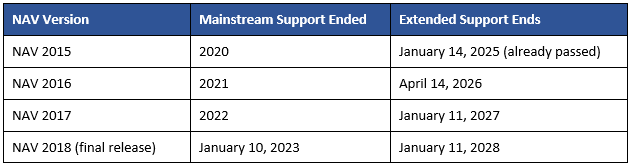
If you’re on anything older than NAV 2015, you’re already fully outside of Microsoft support. And because NAV 2018 was the last version ever released, there’s no newer edition to upgrade into within the NAV product line — Business Central is the only forward path.
What happens after extended support ends?
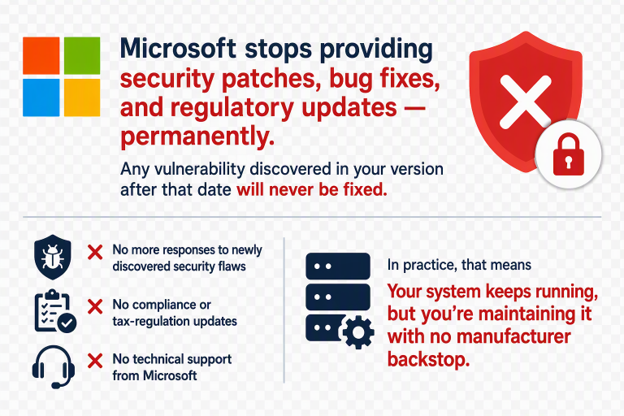
Direct answer: Microsoft stops providing security patches, bug fixes, and regulatory updates — permanently. Any vulnerability discovered in your version after that date will never be fixed. |
In practice, that means no more responses to newly discovered security flaws, no compliance or tax-regulation updates, and no technical support from Microsoft regardless of how severe an issue is. Your system keeps running, but you’re maintaining it with no manufacturer backstop.
Can I keep using NAV after support ends?
Direct answer: Yes, technically — but the risk compounds the longer you stay. You won’t be forced off the system, but you’ll be fully on your own for security and compliance. Many organizations also find that third-party partner support becomes harder to get, since partners have less ability to escalate issues on a product Microsoft no longer maintains. |
Why doesn’t Business Central have this problem?
Direct answer: Business Central online runs on Microsoft’s Modern Lifecycle Policy, which has no fixed end date — as long as you’re a subscriber, you receive continuous updates. That’s a fundamentally different model than NAV’s fixed 10-year clock, and it’s the reason organizations that move to BC stop having this conversation altogether. |

Scheduled Updates in the Admin Center
How long does a NAV to Business Central migration actually take?
|
Direct answer: It depends heavily on your customizations and which path you choose — anywhere from about 6 weeks for a straightforward, lightly customized environment to well over a year, sometimes two, for a complex re-implementation. |
There are really two different paths, and they have very different timelines:
- Upgrade (code and data migration): Best suited to NAV environments with minimal customization. Existing processes carry over largely as-is, just moving to the new platform. This is the faster path — often a matter of weeks to a few months.
- Re-implementation: For organizations with heavy customizations, years of accumulated workarounds, or processes that no longer reflect how the business actually operates. This path rebuilds on standard Business Central functionality rather than carrying old customizations forward, and it’s a much bigger undertaking — realistically months to a couple of years depending on scope.
Also worth knowing: some older NAV versions can’t jump directly to the latest Business Central release. Depending on your starting point, you may need to move through one or more intermediate versions first, which adds time to either path — see the version-path breakdown in What Happens to My NAV Customizations When I Move to Business Central? for the specifics if you’re coming from NAV 2018 or earlier.
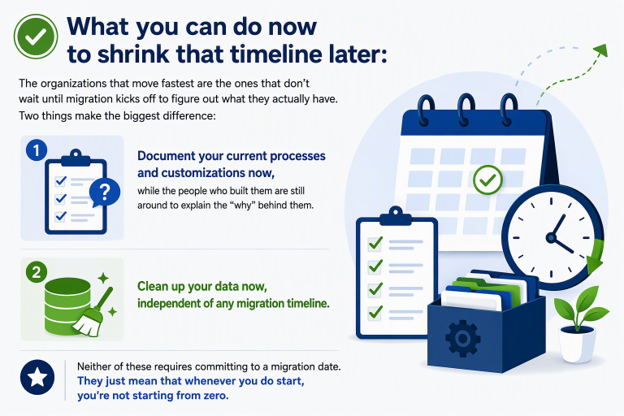
What you can do now to shrink that timeline later: The organizations that move fastest are the ones that don’t wait until migration kicks off to figure out what they actually have. Two things make the biggest difference:
- Document your current processes and customizations now, while the people who built them are still around to explain the “why” behind them. Undocumented customizations are one of the most common sources of delay, because the migration team has to reverse-engineer intent before they can decide whether to carry a feature forward, rebuild it, or retire it.
- Clean up your data now, independent of any migration timeline. Removing outdated vendors, duplicate records, and stale inventory data before a migration is scoped means less to map, test, and validate later — and it’s work you can start immediately, with no dependency on choosing a partner or a go-live date.
Neither of these requires committing to a migration date. They just mean that whenever you do start, you’re not starting from zero.
Frequently Asked Questions
Is Dynamics NAV completely dead?
Not immediately, but it is a closed product line. NAV 2018 was the final release, and once its extended support ends in January 2028, there will be no supported version of NAV left.
Is Business Central just NAV with a new interface?
Not quite — it’s the direct successor built on the same foundational concepts, but with a modern web-based client, cloud deployment options, and a subscription licensing model rather than a one-time purchase.
Will I lose my NAV customizations when I move to Business Central?
Not necessarily, but they typically need to be rebuilt as extensions rather than carried over directly. Documenting your customizations ahead of time is what lets your migration team decide what to rebuild, simplify, or retire, rather than guessing — see What Happens to My NAV Customizations When I Move to Business Central? for the full picture.
Do I have to move to the cloud to leave NAV?
No, but the on-premises path has changed. Microsoft no longer sells new on-premises perpetual licenses — on-prem is now available only as a subscription, or as a “dual use” hybrid that pairs on-prem deployment with cloud access. So you can still run Business Central on-premises, but the licensing model itself has shifted toward the cloud, and cloud deployment remains the only option that eliminates fixed support end-dates altogether.