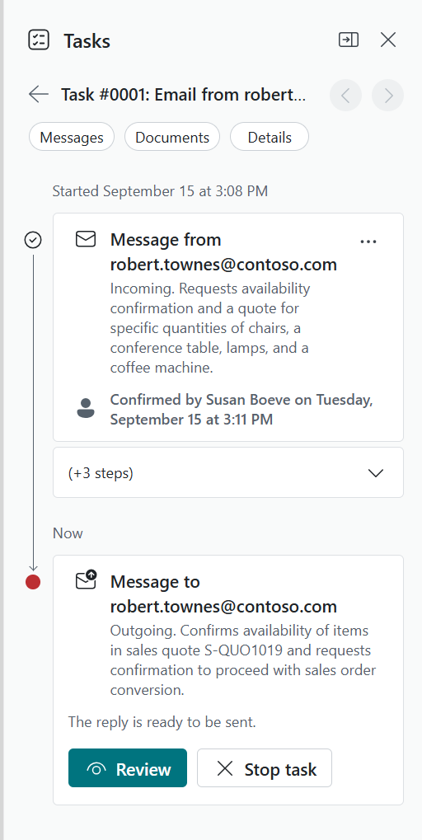

We Tested the Sales Order Agent in Business Central. It Got the Order Right, but It Almost Sent an Email It Shouldn’t Have.
Microsoft’s D365 Business Central Sales Order Agent promises something genuinely useful: read a customer’s email, check inventory, build a quote, and draft a reply, all without a person touching the keyboard. We built a live test scenario in a Business Central sandbox to see how it actually holds up when a request isn’t perfectly clean. It handled the easy part well. Where it stumbled is the more interesting story, and it’s the reason we still recommend a human in the loop.
What is the Sales Order Agent, and what does it actually do?
Direct answer: It’s a Business Central agent that monitors a mailbox, reads incoming customer emails about item requests, checks inventory, and prepares a sales quote with a draft reply, all before a person ever opens the email.
The agent watches a designated mailbox for customer inquiries. When a message comes in, it identifies the customer, pulls the requested items out of the email (and attachments, if there are any), checks whether those items are actually available, and builds a sales quote. It then drafts an outgoing email with the quote attached. Nothing goes out to the customer without a designated Business Central user reviewing and approving it first. That review step isn’t optional. It’s built into how the agent works.
How did we test it?
Direct answer: We simulated a real customer email through the agent’s “Try it out” feature, using a mix of well-stocked and out-of-stock items to see how the agent would handle a clean request and a genuine shortfall in the same scenario.
We set up a test as a registered contact ordering four items from a furniture and equipment line: a batch of chairs, a conference table, and a set of lamps, all well stocked, plus a coffee machine that had zero inventory in the sandbox. The idea was to give the agent one easy win and one real problem, in the same message, and watch what it did with both.
What happened with the items that were in stock?
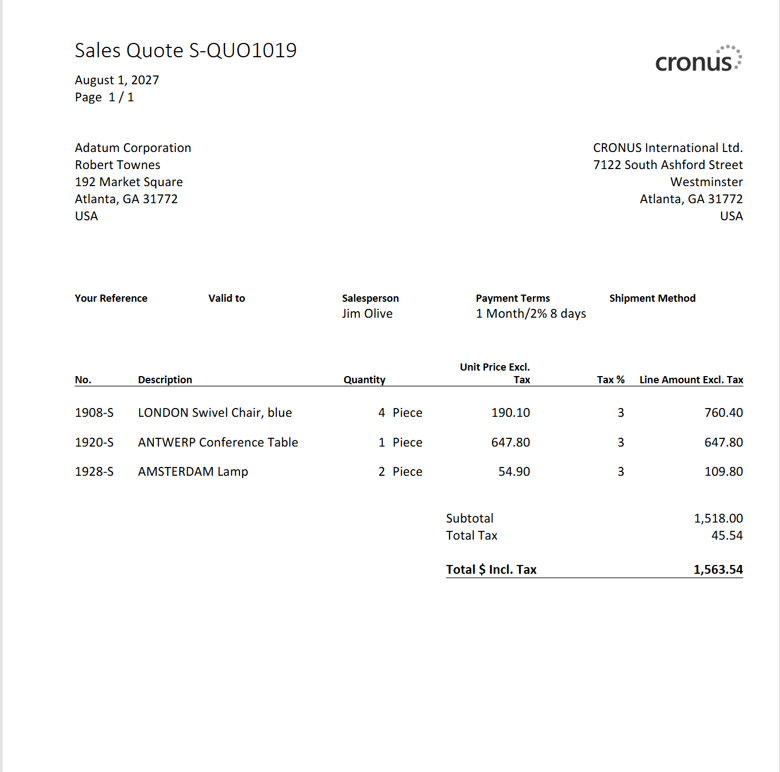
Direct answer: Exactly what you’d want. The agent read the request, confirmed the customer, checked availability, and built a sales quote for the three in-stock items without needing any help.
This part of the process was smooth enough that it’s almost unremarkable, which is the point. The agent correctly matched the contact to the customer account, ran an item availability check, and generated a quote for the chairs, table, and lamps. No intervention needed.
What happened when the agent hit an item with no inventory?
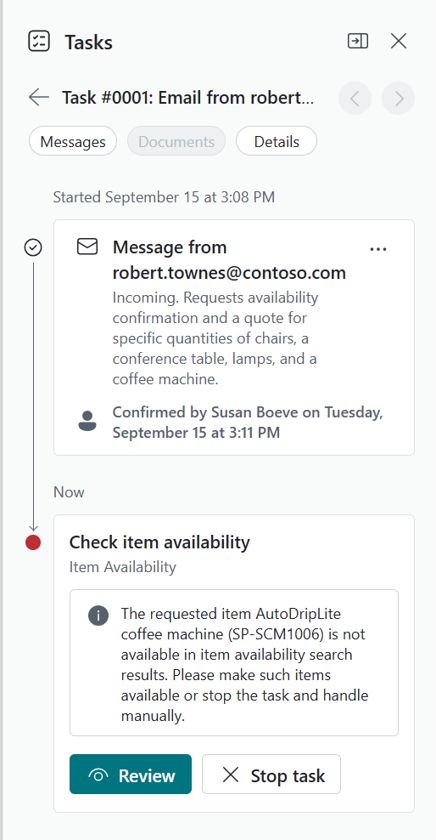
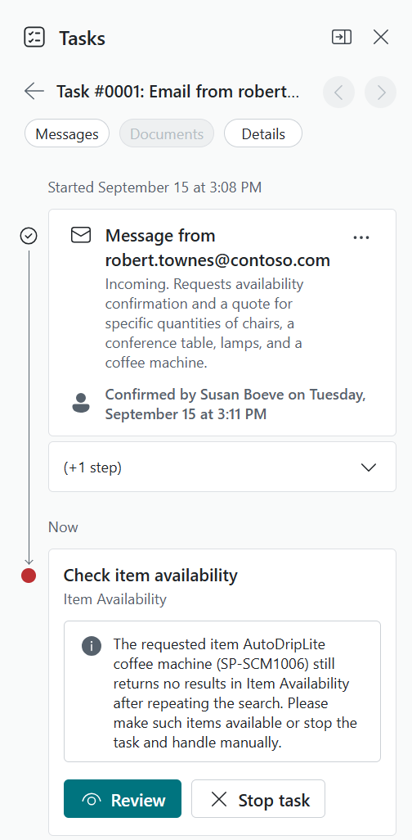
Direct answer: It stopped and asked for a decision instead of guessing. It flagged the coffee machine as unavailable, opened a review screen showing the exact filters it used, and gave us the option to either make the item available or give it a new instruction.
This is the part of the process where the agent’s design actually shows its judgment. Rather than silently dropping the item or silently including it anyway, it surfaced the problem and paused.
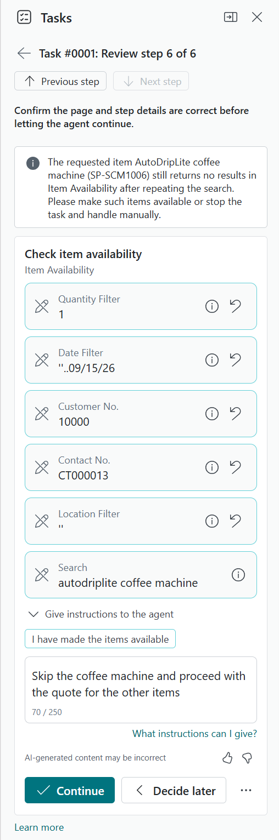
The review screen showed the real BC Item Availability page next to a task pane with the specific search filters the agent had used, each one editable, plus a plain-language box to tell the agent what to do next.
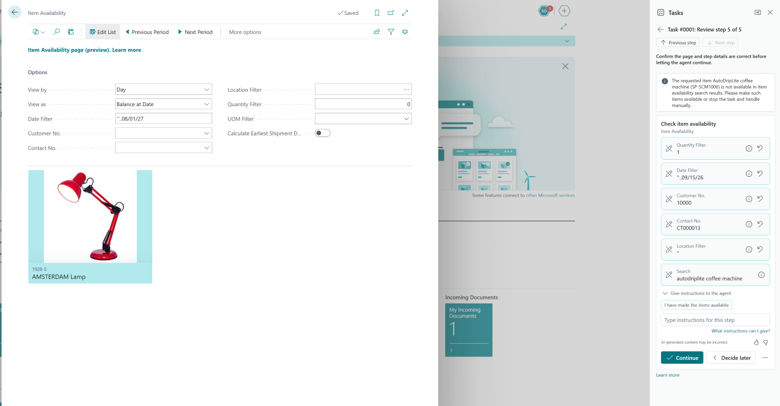
The item availability review screen, showing the editable search filters alongside the actual BC Item Availability page
Trying to continue without giving that instruction just brought the agent back to the same wall, which was reassuring in its own way. It wasn’t a soft check the agent could be talked past by accident.
Typing an instruction to skip the coffee machine and proceed with a quote for the remaining items was enough to get it moving again.
The custom instruction telling the agent to skip the coffee machine and proceed with a quote for the remaining items
So where did it fall short?
Direct answer: The agent generated a customer-facing email confirming the quote and attaching it, but never mentioned that the coffee machine had been left out. A human reviewer had to catch that and add the missing explanation before the email went out.
This is the finding worth sitting with. The agent followed the instruction correctly. It built the right quote for the right items.
But the draft it prepared for the customer read as if the original request had been fully satisfied. Nothing in the email said “we couldn’t include the coffee machine.” A customer reading that draft would have no reason to expect a partial order.
We added a line explaining the exclusion and confirmed the fix through the agent’s review flow before considering the task done.
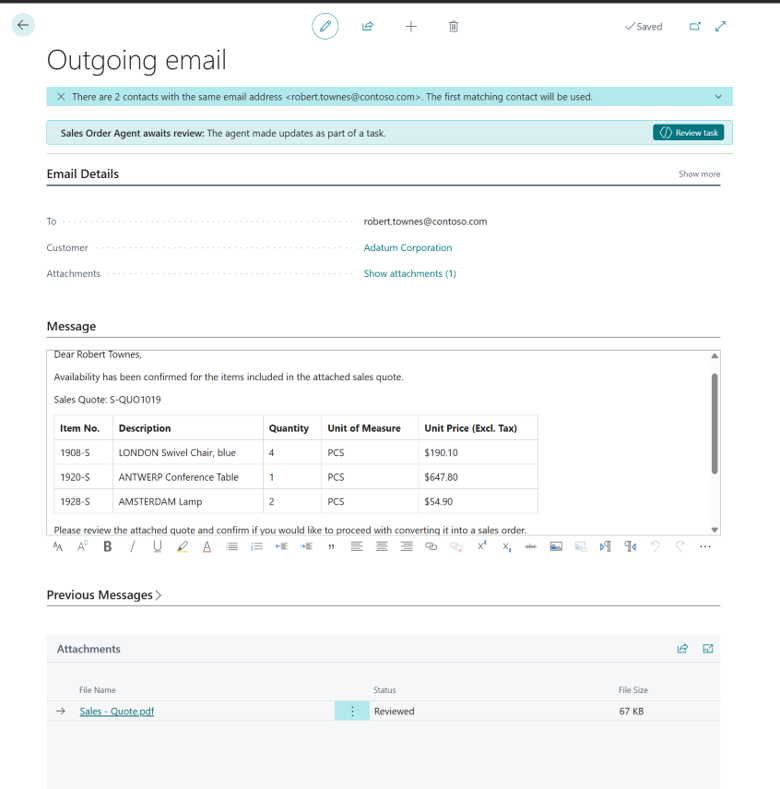
Reviewing and correcting the outgoing email through the agent’s task pane.
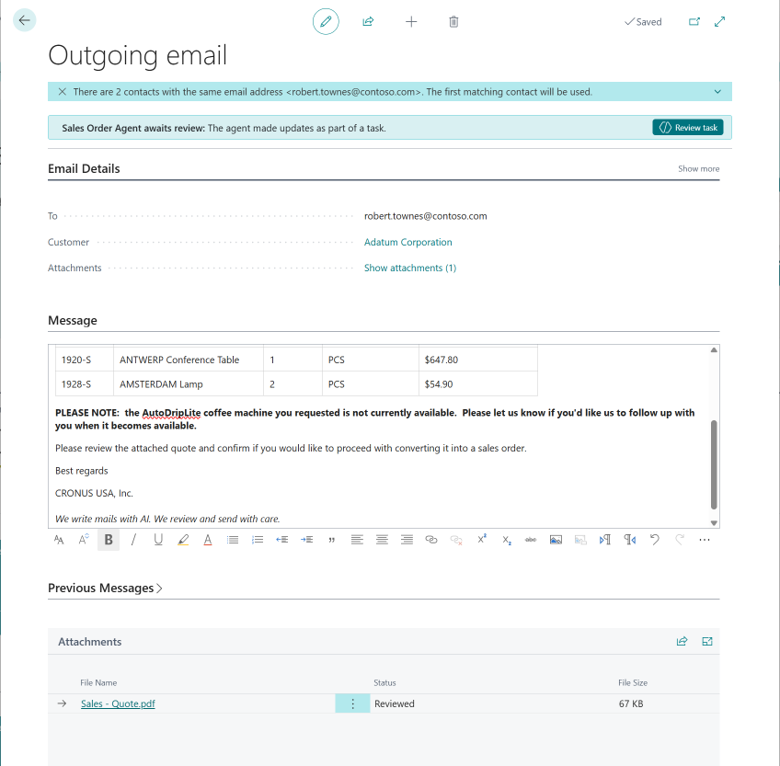
The revised outgoing email, now including an explicit note about the excluded item
It’s a small gap with a real consequence. An agent that quietly drops a requested item, without flagging it to the person who asked for it, isn’t actually finished with the task. It just looks finished.
Did anything else come up worth knowing about?
Direct answer: Yes, a smaller one. The agent flagged that two contacts shared the exact same email address, and it defaulted to the first match without asking which one was correct.
This is a data quality issue more than an agent issue. It’s a useful reminder that an agent is only as reliable as the data it’s reading from. Duplicate contact records, mismatched customer numbers, and similar data hygiene problems can quietly steer an otherwise well-built process in the wrong direction.
What’s the takeaway for a team considering this?
Direct answer: The Sales Order Agent is a legitimately capable first pass at a repetitive, time-consuming task, but “review before it sends” isn’t a formality. It’s the step that catches the kind of gap a customer would actually notice.
The agent handled a multi-item request, correctly separated available from unavailable inventory, and produced a usable quote, all from a single email. That’s real time saved on a task most BC users know all too well. But the missing exclusion note is exactly the kind of thing that’s easy to miss if the review step gets treated as a rubber stamp instead of an actual read-through. Fast and mostly right still needs a person checking the last ten percent before it reaches a customer.
Frequently Asked Questions
Does the Sales Order Agent send emails to customers on its own?
No. A designated Business Central user reviews and approves every outgoing message before it’s sent. The agent drafts the reply; it doesn’t send it unsupervised.
Does the agent only work with items already in Business Central?
The agent works within your existing item and inventory data. Its accuracy on availability checks depends on that data being current, the same as any other BC process that checks stock.
What happens if the agent can’t fully resolve a request?
It stops and asks. In our test, it presented the specific issue, the filters it used to check availability, and options for how to proceed, rather than guessing or skipping the step silently.
Is this something we could test without touching a live mailbox?
Yes. The agent includes a “Try it out” feature that simulates an incoming task using a manually entered message, which is exactly how this scenario was built.
Want to see this in more depth?
This scenario is a preview of a bigger conversation we’re having about agents in Business Central: what they’re genuinely good at, where they still need a person watching, and how to roll them out without creating new risk. If that’s useful to you, keep an eye out for our upcoming webinar on AI agents in Business Central, where we’ll walk through this and other real scenarios in more detail.